Lambda
Notes on C++ lambdas: basic syntax, generic lambdas with auto, mutable, and capturing by copy or by reference, with C++20 updates.
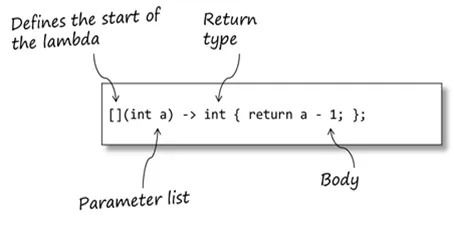
A lambda is a way to create a function object in C++. The basic structure is:
[<captures>](<args>) <mutable> <exception_spec> -> <return_type> { /* code */ }To see the type of a lambda:
#include <iostream>
#include <typeinfo>

int main()
{
    auto fn = [](){return 0;};
    std::cout << typeid(fn).name() << std::endl;
}
Notice that a lambda is a function object. The compiler generates a unique, unnamed class with an operator() for every lambda, so the printed name is something compiler specific.
If you are using C++14 or later, you can use the auto keyword in the parameter list to create a generic lambda (it works like a template). To change your CMake setting, check the following line.
set(CMAKE_CXX_STANDARD 14)And then using auto in C++:
auto fn = [](auto x){return x * x;};
std::cout << fn(2) << std::endl;
Update (2026): Since C++20 you can also write an explicit template parameter list, which is handy when you need the type name inside the lambda:
auto fn = []<typename T>(T x){ return x * x; };
Capturing a variable as a copy:
#include <iostream>

int main()
{
    int variable = 3;
    auto fn = [variable](auto x){return variable * x;};
    std::cout << fn(2) << std::endl;
}
The way to mutate a captured item:
#include <iostream>

int main()
{
    int variable = 3;
    // mutable lets us change the copy, but not the original variable
    auto fn = [variable](auto x) mutable{
        variable++;
        return variable * x;
    };
    std::cout << fn(2) << std::endl;
    std::cout << "variable " << variable << std::endl; // still 3
}
The best way to change a variable outside of the lambda is to capture it by reference.
#include <iostream>

int main()
{
    int variable = 3;
    // captured by reference, so the original variable changes
    auto fn = [&variable](auto x){
        variable++;
        return variable * x;
    };
    std::cout << fn(2) << std::endl;
    std::cout << "variable " << variable << std::endl; // 4
}
To capture all the local variables you use in the lambda by reference, just put & in the capture list. Global and static variables don’t need to be captured at all, the lambda can use them directly.
#include <iostream>

int main()
{
    int variable = 3;
    // everything used in the body is captured by reference
    auto fn = [&](auto x){
        variable++;
        return variable * x;
    };
    std::cout << fn(2) << std::endl;
    std::cout << "variable " << variable << std::endl;
}
And = to capture copies.
#include <iostream>

int main()
{
    int variable = 3;
    // everything used in the body is captured by copy
    auto fn = [=](auto x) mutable{
        variable++;
        return variable * x;
    };
    std::cout << fn(2) << std::endl;
    std::cout << "variable " << variable << std::endl;
}
Be careful with reference captures: if the lambda lives longer than the variables (for example you return it from a function or give it to a thread), the references dangle.
Update (2026): Inside a member function,
[=]used to capturethisimplicitly. That is deprecated since C++20, because it looks like a copy but actually captures a pointer. Write[=, this]if you want the pointer, or[*this](C++17) to copy the whole object. C++20 also made captureless lambdas default constructible and allowed lambdas in unevaluated contexts, so you can write things likestd::set<int, decltype([](int a, int b){ return a > b; })>.